Saturday, 9 February 2013

5 Interesting Apps of the Week #1

Welcome to the first episode of Interesting Apps of the Week. I will try to put my personal favorite apps of every week in this series. So lets start. NOTE: Click on the application's name to download.


  • WolframAlpha ($2.99).                                                                                                                            You might need a great calculator that does everything for you. WolframAlpha is probably the best calculator you will ever find. It covers a lot of the mathematics fields such as calculus, Algebra, and many more. However, that's not all, it also covers other fields of science. It is basically your study reference. 


  • Head Soccer (FREE)                                                                                                                        This game is an addictive game that makes football much more fun. You control those mini footballers and play football with no rules. Isn't that the dream? There are a lot characters and countries that you can play with and 4 different modes, Survival, Tournament, Arcade, or Multiplayer. By the way, I personally prefer Head Soccer to Fifa 13.

  •  Fit Brains Trainer (FREE)                                                                                                                     This is an application controlled by DR. Paul Nussbaum, a specialist in brain health across the lifespan. It gives you daily training sessions for your brain. Each session includes different simple puzzles that you should solve during the time limit. It should help you have a healthier brain, not to mention that it is really fun.
                                         
  • Appsfire (FREE)                                                                                                                                              A great application that organizes most applications for users. It shows great deals and app-discounts to help you enjoy the best of the App Store without going broke. 
  • Dead Trigger (FREE)                                                                                                                                      Zombie games are my favorite type of games. But they are not so good when it comes to mobile devices. However, it's not the same with Dead Trigger. The graphics are good, the story is good, and the controls are not so bad. To sum up, it is one of the best zombie-games on the App Store 

Tuesday, 5 February 2013

How to Untethered Jailbreak iPhone/iPod Touch/iPad running iOS 6.1

Since September 19th, we have been waiting for the iOS 6 jailbreak. Yesterday, we got it. The new iOS hacking team "evad3rs" released the jailbreak we have been waiting for and they called it Evasi0n. Here's a video from iDownloadBlog showing you how to get it. This works on all devices running iOS 6.1


Friday, 25 January 2013

How To Get AppShopper Back To Your iPhone/iPad

AppShopper is an amazing free application that tells you all about the application discounts. It is like a better version of the App Store. However, Apple removed it from the App Store. So here's a way to get it back.


Step 1_  You will need to have a jailbroken device.

Step 2_   Open up Safari and go to THIS LINK and click install. You will find an application called VSHARE installed on your home screen which we will use as an application installer.

Step 3_  Open up VSHARE and go to the Search tab and search for AppShopper and click install.

Step 4_  Go to the downloads tab and click on the application and choose install.


GET PAID APPS FOR FREE LEGALLY #1

Sunday, 20 January 2013

How To Get Paid Apps For FREE Legally #1

A lot of iOS users find it difficult to pay for their applications. So, they use pirating to get their applications for free. However, there are other better ways to pay for your applications. So I will try to show you every possible way to get the paid applications for free legally on your iDevice. Let's start with the first method.


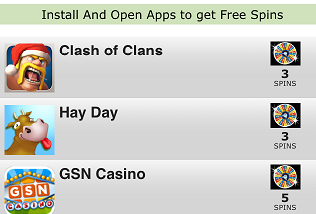
First, Open up THIS LINK  from your iPhone, iPod Touch, or iPad. Then it will take you to the settings. Click install from the settings and you will be back to the website. Here's the main page of the website:


Here's how this website works, you try to get spins, then you cash your spins to get credits, then you cash your credits to turn it to real prizes.


So, how do you get spins? There are two ways to get spins:


  1. By downloading sponsored applications. Simply click the "Get More Spins" button, and you'll find a few applications, each one you download gives you a few spins. By the way, all of these applications are free.
  2. By sharing this website. Each one that signs up for the website using your link gives you 5 additional spins. So share your link by clicking Get More Spins > Invite Friends, Get Spins. Then choose your sharing method.


When you get your spins, cash them by clicking "Spin" on the main page. It will spin some pictures, and you will get your credits depending on how the pictures match when you spin them.


When you get enough amount of credits, click Cash Out on the main page. You will find a list of the prizes you can get, such as paid apps, gift cards, and even iDevices. Click on the one you want and you're done. CONGRATULATIONS!!

Please share this post if you found it useful.

Saturday, 19 January 2013

New iOS Lock Screen Concept

Lock Screen Drawer is a new iOS lock screen concept that allows users to access toggles on their lock screen. It is a very useful thought that Apple could make it real with iOS 7, since a lot of people want to access their settings easily. Anyway, Lock Screen Drawer shows 4 different toggles at the moment, WiFi, Airplane Mode, Bluetooth, and Personal Hotspot. Check it out in this video.


Would you like to have these toggles on iOS 7?

Source: Dribble

Thursday, 17 January 2013

Free Version of Amazing Alex

Another game from Rovio is free now. Hours ago, it was Angry Birds Rio. Now it is Amazing Alex, but Amazing Alex had a new free version, which means there still is a paid version of the game. So, Rovio just released a shorter free version of Amazing Alex with a few ads.


                          Get Amazing Alex Free                                         Get Amazing Alex
                          For iPhone                                                            For iPhone (Price: $0.99)
                          For iPad                                                                For iPad (Price: $2.99)

Angry Birds Rio, Free for a Limited Time

Rovio's Angry Birds Rio and Angry Birds Rio HD both gone FREE for a limited time. This is good news for millions of the game's fans, so if you want to get the game, hurry up and get it for free before it comes back to the original price.


You can get Angry Birds Rio on your iPhone/iPod Touch HERE
Or get Angry Birds Rio HD on your iPad/iPad Mini HERE